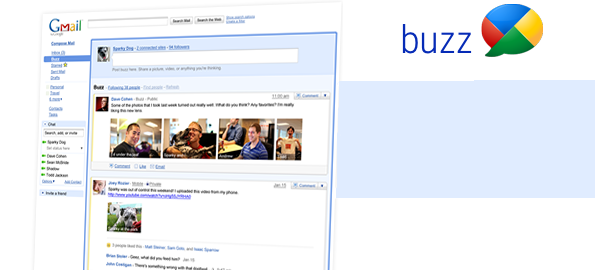
Looks like Google is not satisfied with all its kills. Yes, it does get hungry often. With Google Buzz, it’s all against Facebook now.
With the recent Google Buzz, now Google allows you to automatically follow people you email or chat with. You can also share your ideas to the internet world or share only with your closest friends. Buzz also allows you to keep your comments in your inbox so you can keep the conversation going.
Google Buzz also allows you to import your profiles, photos, friends and network from other Google sites like Twitter, Flickr, Google Reader and Picasa.
With so much to offer and Gmail as a huge advantage, Google is all set to take on Facebook headon. Facebook on the other hand is still struggling on finding a clear business model. With its many recent updates claiming better features and user friendliness, the user experience has just gone from bad to worse. None better! But then on the other hand, not all products of Google have clicked. Anyone uses Google Wave or Orkut still? Well, most would have not even heard of Google Wave.
Many Facebook addicts are seriously concerned about Google Buzz. Google as you know is a money making machine and can make money out of any object that it steps on; even without the objects notice. Facebook users are posting messages asking Facebook to take some immediate steps:
Stop any synchronization with Google or its products
Do not allow Google to post any updates or info on any Facebook channel
Do not allow Google to crawl Facebook or gather any info on Facebook to publish on Google’s channels
Start a free web mail service like Google for Facebook users.
And many more..
Google’s Buzz has become a thing of hatred to Facebook lovers more than for Facebook itself. On the other hand, Google Buzz does not seem to be that much interesting to Gmail users. Just a interesting icon on their left hand gmail menu. Lets wait to see how much interesting this Google Buzz is to the social media world.
It is infact possible to send mails from any email address using your Gmail. Isn’t that cool? You can use Gmail and send an Yahoo or any other email address mail. Please follow the steps below to set up send and receive from another email address. Read the full story
Google has introduced Gmail for its first Android-powered phone, T-Mobile G1. Gmail for Android has more to offer than for Symbian and Windows Mobile.
Gmail for Android auto updates new e-mail messages as it arrives and helps create or find messages faster.
Some of the key features of Gmail on Android are:
Push email: Gmail on Android auto refreshes its mail box and hence you do not need to refresh or log in again to check new email arrivals
Notifications: Gmail for Android can notify you whenever a new email arrives on the status bar itself similar to a new SMS alert. Hence you would be aware of any new messages when it arrives.
Address Autocomplete: Similar to the normal Gmail on your desktop, Gmail on Android also lets you enter long email addresses using just a few keystrokes.
View Attachments: Android also helps open email attachments like photos, Microsoft Word™ documents, MP3s and PDF files by just clicking on them.
T-Mobile G1, also called the Google cell phone is the worlds first cell phone with an Android open-source operating system. The phone has been developed with partnership with HTC, Google and the Open Handset Alliance.
Google has introduced Gmail for mobile version 2.0 for J2ME-supported and BlackBerry phones. Google mentions that this version would make the experience faster and more reliable.
The following features are highlighted by the Google Mobile team at its Google Mobile Blog:- Overall performance improvement: You should experience significant raw speed improvement, smoother scrolling, and no freezing.- Multiple accounts management: If you have both a Gmail and Google Apps email account, you can easily switch between them quickly. You will no longer have to use two different mobile apps to access personal and work emails.
- Multiple mobile email drafts: You can save multiple email drafts in your mobile phone, so that you can pick and choose what you would like to send later.
- Powerful shortcut keys: If you have a QWERTY phone, you can use shortcut keys. Hit ‘z’ to undo, ‘k’ to go to a newer conversation, and ‘j’ to go to an older conversation. See Menu/Help in the app for more shortcuts.
- Basic offline support: Can’t get a signal? Not a problem. You can compose and read your most recent emails even when there is no signal. Also, any outgoing messages will be saved in the outbox on your phone and sent automatically when you’re back in coverage.
The new version can be downloaded using your compatible mobile at m.google.com/mail . The mobile 2.0 Gmail is also available in over 35 languages.
Unable to access your mail can be frustrating especially when you have an important mail to be read in your account. Some of the possible reasons could be;
Your internet connection is slowSlow internet connections can prevent you from accessing your gmail account. Usually, the symptoms are the browser progress bar does not move. Your page may also not load after you provide your username and password and click on “sign in”Resolution:Check with your Internet Service Provider for this issue.
Wrong password.This is one of the most common reasons users contact customer support. Resoultion:Use the “Forgot Password” link on the login screen. Or click here
Network security settingsIf you are trying to access Gmail inside your office or a secure network like an organization or library, the reason might be that the network administrator has blocked access. In this case, you would not be able to view the login screen.Resolution:Please contact your network administrator.
Temporary issue with GmailSometimes Gmail may be on a scheduled maintenance or one of its servers might be experiencing a temporary issue.Resolution:The only thing you can do is to just wait for few minutes or an hour and try again.